datamodel-code-generator
🚀 Generate Python data models from schema definitions in seconds.
Getting Started Open Playground Lead maintainer available for work





✨ What it does
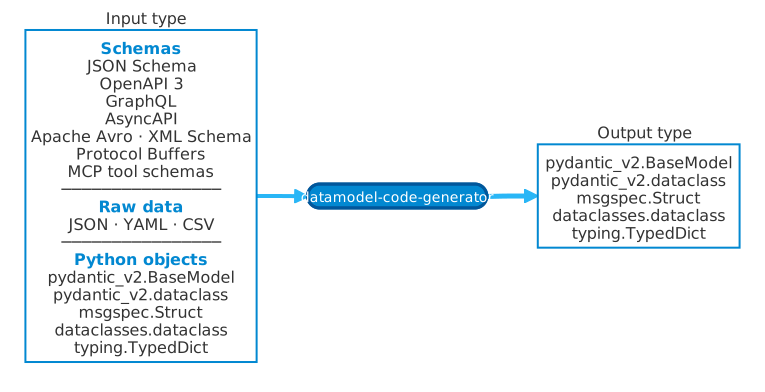
Pick any one of the supported inputs and pick the Python model style you want as output.
--input-model path/to/file.py:ClassName can even retarget an existing Pydantic, dataclass, or TypedDict class defined
in another Python file to a different output type.
- 📄 Converts OpenAPI 3, AsyncAPI, JSON Schema, Apache Avro, XML Schema, Protocol Buffers/gRPC, GraphQL, MCP tool schemas, and raw data (JSON/YAML/CSV) into Python models
- 🐍 Generates from existing Python types (Pydantic, dataclass, TypedDict) via
--input-model - 🎯 Generates Pydantic v2, Pydantic v2 dataclass, dataclasses, TypedDict, or msgspec output
- 🔗 Handles complex schemas:
$ref,allOf,oneOf,anyOf, enums, and nested types - ✅ Produces type-safe, validated code ready for your IDE and type checker
🧪 Try It In Your Browser
Generate models in your browser without installing anything.
Playground privacy
Generation runs locally in your browser with Pyodide. Your schema and options are not sent to a backend. Shared
repro URLs encode them in the URL fragment (#state=...), which browsers do not send to the server; the full URL
can still be stored in your browser history or wherever you share it.
🚀 Start Here
Install the CLI and generate your first model from Getting Started. Then add
--recommend-options to that command to get options suited to your schema (experimental).
Default output model
When --output-model-type is omitted, datamodel-code-generator generates Pydantic v2 BaseModel output
(pydantic_v2.BaseModel). Use --output-model-type explicitly when you want dataclasses, TypedDict, or msgspec
output.
📥 Choose Your Input
| Input Type | File Types | Example |
|---|---|---|
| 📘 OpenAPI 3.0/3.1/3.2 | .yaml, .json |
API specifications |
| 📡 AsyncAPI | .yaml, .json |
Event-driven API specifications |
| 📋 JSON Schema | .json, .yaml |
Data validation schemas |
| 🪶 Apache Avro | .avsc, .json |
Avro schemas |
| 🧾 XML Schema | .xsd |
XML document schemas |
| 🧩 Protocol Buffers / gRPC | .proto |
Protobuf messages and service schemas |
| 🔷 GraphQL | .graphql |
GraphQL type definitions |
| 🛠️ MCP Tool Schemas | .json, .yaml |
MCP tool input/output schemas |
| 📊 JSON/YAML/CSV Data | .json, .yaml, .csv |
Infer schema from data |
| 🐍 Python Models | .py |
Pydantic, dataclass, TypedDict |
✅ Conformance Signals
CI exercises datamodel-code-generator against pinned external corpora for XML Schema, JSON Schema, AsyncAPI, Apache Avro, and Protocol Buffers. See the Conformance Dashboard for the generated summary of runner scripts, tox environments, CI jobs, expected corpus counts, and upstream sources.
📤 Choose Your Output
# 🆕 Pydantic v2 (recommended for new projects)
datamodel-codegen --output-model-type pydantic_v2.BaseModel ...

# 🏗️ Python dataclasses
datamodel-codegen --output-model-type dataclasses.dataclass ...

# 📝 TypedDict (for type hints without validation)
datamodel-codegen --output-model-type typing.TypedDict ...

# ⚡ msgspec (high-performance serialization)
datamodel-codegen --output-model-type msgspec.Struct ...
See Supported Data Types for the full list.
🌐 Generate a FastAPI server or an HTTP client (experimental)
Experimental
Server and client generation are experimental since 0.84.0: their options and generated packages may change. See Experimental Features.
From one OpenAPI document, --generate-server fastapi writes a FastAPI server package and --generate-client httpx2
an HTTPX2 client package, in the same run as the models. The models stay the runtime contract: routes and client
methods take and return the generated models, so the server and the client parse and produce the same classes you already
use. Every generated file is regenerated on each run; keep your own code outside the generated packages.
The commands put everything in one application package, app: the generated app/models.py, app/server/, and
app/client/, and your app/services/, so no generic top-level name such as models or server is taken.
This example is the FastAPI server tutorial, and the tests of this project run it as shown.
Input (openapi.yaml)
openapi: 3.1.0
info:
  title: Pets
  version: "1.0"
servers:
  - url: http://localhost:8000
paths:
  /pets:
    get:
      operationId: listPets
      tags: [pets]
      parameters:
        - name: limit
          in: query
          schema: {type: integer, minimum: 1, maximum: 100, default: 20}
      responses:
        "200":
          description: The pets.
          content:
            application/json:
              schema: {$ref: "#/components/schemas/Pets"}
    post:
      operationId: createPet
      tags: [pets]
      requestBody:
        required: true
        content:
          application/json:
            schema: {$ref: "#/components/schemas/NewPet"}
      responses:
        "201":
          description: Created.
          content:
            application/json:
              schema: {$ref: "#/components/schemas/Pet"}
  /pets/{petId}:
    get:
      operationId: getPet
      tags: [pets]
      parameters:
        - name: petId
          in: path
          required: true
          schema: {type: integer}
      responses:
        "200":
          description: The pet.
          content:
            application/json:
              schema: {$ref: "#/components/schemas/Pet"}
        "404":
          description: No pet has this ID.
          content:
            application/json:
              schema: {$ref: "#/components/schemas/Error"}
components:
  schemas:
    NewPet:
      type: object
      required: [name]
      properties:
        name: {type: string}
        tag: {type: string}
    Pet:
      type: object
      required: [id, name]
      properties:
        id: {type: integer}
        name: {type: string}
        tag: {type: string}
    Pets:
      type: array
      items: {$ref: "#/components/schemas/Pet"}
    Error:
      type: object
      required: [message]
      properties:
        message: {type: string}
Commands
# The application package app, which the generated packages go into
mkdir -p app && touch app/__init__.py

# FastAPI server package in app/server/
datamodel-codegen \
  --input openapi.yaml \
  --input-file-type openapi \
  --openapi-scopes schemas api \
  --output-model-type pydantic_v2.BaseModel \
  --preset standard-py312-20261017 \
  --output app/models.py \
  --generate-server fastapi \
  --server-output app/server \
  --server-package app.server \
  --server-model-package app.models

# HTTPX2 client package in app/client/
datamodel-codegen \
  --input openapi.yaml \
  --input-file-type openapi \
  --openapi-scopes schemas api \
  --output-model-type pydantic_v2.BaseModel \
  --preset standard-py312-20261017 \
  --output app/models.py \
  --generate-client httpx2 \
  --client-output app/client \
  --client-package app.client \
  --client-model-package app.models
--openapi-scopes must include api, and both need Python 3.11 or later, to run and as the target version (the preset
sets 3.12); left unset, the run sets them and says how. Each run ends by printing the runtime dependencies of its
package to stderr:
Add the runtime dependencies of app.server to your project:
  uv add "fastapi>=0.141.1" "pydantic>=2.14.0" "typing-extensions>=4.16"
Next steps: implement the stubs in app/services/pets.py, then run the server:
  uv add uvicorn && uv run uvicorn app.server.main:app --reload
or: uv add "fastapi[standard]" && uv run fastapi dev --entrypoint app.server.main:app
See app/server/README.md.
Add the runtime dependencies of app.client to your project:
  uv add "httpx2>=2.13.0" "typing-extensions>=4.16" "pydantic>=2.14.0"
Next steps: call the API with the client:
  from app.client import Client

  with Client(base_url=...) as client:
      client.pets.list_pets(...)
See app/client/README.md.
Generated files (trimmed)
Implement the server in app/services/pets.py, which generation wrote once with stubs, by replacing the stubs of the
Pets class that subclasses the generated service Protocol; type checkers report a missing method or a mismatched
signature:
from app import models
from app.server import HTTPResult
from app.server.services import PetsService


class Pets(PetsService):
    def __init__(self) -> None:
        self.pets: dict[int, models.Pet] = {}

    def list_pets(self, *, limit: int) -> models.Pets:
        return models.Pets(list(self.pets.values())[:limit])

    def create_pet(self, *, body: models.NewPet) -> models.Pet:
        pet = models.Pet(id=len(self.pets) + 1, name=body.name, tag=body.tag)
        self.pets[pet.id] = pet
        return pet

    def get_pet(self, *, pet_id: int) -> models.Pet | HTTPResult[models.Error]:
        if (pet := self.pets.get(pet_id)) is None:
            return HTTPResult(404, models.Error(message=f"Pet {pet_id} not found"))
        return pet
Call it with the client in call.py, which sends to the document's server URL by default:
from app.client import Client
from app.client.errors import NotFoundError
from app.models import NewPet

with Client() as client:
    pet = client.pets.create_pet(body=NewPet(name="Mimi", tag="cat"))
    print(pet)
    for listed in client.pets.list_pets(limit=10).root:
        print(listed.name)
    try:
        client.pets.get_pet(pet_id=99)
    except NotFoundError as error:
        print(error.status_code, error.body)
It prints:
AsyncClient offers the same methods as coroutines. See FastAPI Server Generation and Python Client Generation for every option, the
pyproject.toml settings, authentication, and the Python API.
🍳 Common Recipes
CLI option quick starts
Use these starting points when combining options; each option links to the generated CLI reference for details and examples.
- Generate a local schema file: Pin the input type and destination when the source extension is ambiguous or generated output needs a stable path. Options:
--input,--input-file-type,--output. - Target Pydantic v2 on modern Python: Set the output model family and Python/Pydantic compatibility targets together. Options:
--output-model-type,--target-python-version,--target-pydantic-version. - Use modern Python annotations: Target a recent Python version and prefer built-in collection and union syntax in generated types. Options:
--target-python-version,--use-union-operator,--use-standard-collections. - Normalize incoming field names: Convert source names to Python identifiers while preserving explicit alias data for runtime IO. Options:
--snake-case-field,--original-field-name-delimiter,--aliases. - Generate operation-focused models: Limit OpenAPI output to operation shapes and name models from operation IDs and status codes. Options:
--openapi-scopes,--use-operation-id-as-name,--use-status-code-in-response-name. - Resolve remote references deliberately: Enable remote
$refloading and configure request metadata, timeouts, or local ref roots. Options:--allow-remote-refs,--http-headers,--http-timeout,--http-local-ref-path.
See the CLI Reference for the full option list and category-specific recipes.
🤖 Get CLI Help from LLMs
Generate a prompt to ask LLMs about CLI options:
See LLM Integration for more examples.
🌐 Generate from URL
pip install 'datamodel-code-generator[http]'
datamodel-codegen --url https://example.com/api/openapi.yaml --output model.py
The http extra is the stable, non-deprecated backend. For the experimental
HTTPX2 alternative, pass --http-backend httpx2; see
HTTP backend selection.
⚙️ Use with pyproject.toml
[tool.datamodel-codegen]
input = "schema.yaml"
output = "src/models.py"
output-model-type = "pydantic_v2.BaseModel"
Then simply run:
See pyproject.toml Configuration for more options.
🔄 CI/CD Integration
Validate generated models in your CI pipeline:
# Replace vX.Y.Z with a released action version.
- uses: datamodel-code-generator/datamodel-code-generator@vX.Y.Z
  with:
    input: schemas/api.yaml
    output: src/models/api.py
See CI/CD Integration for more options.
📚 Next Steps
- 🖥️ CLI Reference - All command-line options with examples
- 🧰 Presets - Recommended immutable option bundles
- 🌐 FastAPI Server Generation - Experimental FastAPI server package from OpenAPI
- 📡 Python Client Generation - Experimental HTTPX2 client package from OpenAPI
- ⚙️ pyproject.toml Configuration - Configure via pyproject.toml
- 🚀 One-liner Usage - uvx, pipx, clipboard integration
- 🔄 CI/CD Integration - GitHub Actions and CI validation
- ✅ Conformance Dashboard - External corpus and CI coverage signals
- 📈 Performance Benchmarks - Release benchmark tables and interactive charts
- 🎨 Custom Templates - Customize generated code with Jinja2
- 🖌️ Code Formatting - Configure black, isort, and ruff
- ❓ FAQ - Common questions and troubleshooting
💖 Sponsors

OpenAI |
🏢 Used by
These public examples are grouped by how each project uses datamodel-code-generator.
Code generation and runtime integration
- openai/codex - Generate public Python SDK types from protocol schemas
- modelcontextprotocol/python-sdk - Generate MCP protocol models from vendored JSON Schemas
- typesafe-ai/typesafe-sdk-python - Generate official Jev Python SDK models from the TypeSafe OpenAPI schema
- modular/modular - Generate MAX Serve KServe schemas from OpenAPI with datamodel-codegen
- apache/airflow - Generate OpenAPI datamodels for airflow-ctl and task-sdk via pyproject codegen config
- PostHog/posthog - Generate Pydantic models from JSON Schema
- airbytehq/airbyte - Generate Python, Java/Kotlin, and Typescript protocol models
- open-metadata/OpenMetadata - datamodel_generation.py
- topoteretes/cognee - Runtime generation of graph data models from JSON Schema
- e2b-dev/E2B - Generate MCP server TypedDict models via Makefile
- DataDog/integrations-core - Config models
- open-telemetry/opentelemetry-python - Generate SDK configuration dataclasses from JSON Schema
Development, testing, and evaluation
- browser-use/browser-use - Evaluation dependency
- vllm-project/vllm - Test dependency for MiniCPM3 tests
- stanfordnlp/dspy - Generate Pydantic models from JSON Schema for reliability tests
👥 Maintainers
- Koudai Aono (@koxudaxi) - Lead maintainer
- Bernát Gábor (@gaborbernat) - Maintainer
- Antonio Spadaro (@ilovelinux) - Maintainer